























About VAR Room
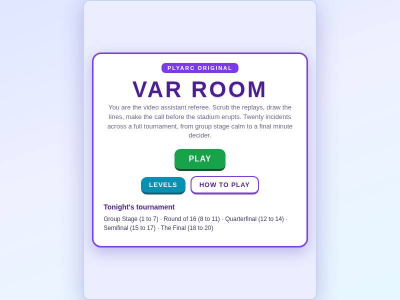
Twenty tournament incidents in the video referee booth, from group stage routine to a 90th minute final decider.
About this game
VAR Room puts you in the seat of the video assistant referee for a full tournament of controversial incidents. Each of the 20 levels hands you one question: was the striker offside when the pass was played, did the defender handle the ball on purpose, was that a dive or a penalty, did the whole of the ball cross the line. You get the tools the booth has: a scrubbable replay with slow motion, Broadcast, Tight and Goal Cam views, and a draggable offside line for the tight calls. You also get what the booth gets: a clock that never stops, a crowd that gets louder as it runs down, and a monitor that starts to shake when the stadium turns. Correct calls earn up to three stars from speed and line precision, build your reputation toward Head of VAR, and unlock twelve achievements. Wrong calls get overturned and cost reputation, and if the reputation meter empties you are relieved of duty. Twenty incidents, six kinds of decisions, one final minute call that decides the trophy. No account required and no ads interrupt your game.
- Controls
- Mouse or touch: drag the timeline to scrub, drag on the pitch to place the offside line, click cameras and decisions. Keys: Space play or pause, arrows scrub, 1 2 3 cameras, S slow motion, P pause, M mute
- Supported devices
- Desktop, phone, tablet
- Developer
- Plyarc
- Genre
- Arcade
- Latest update
- October 2026
- Rating
How to play
- 1
Press PLAY and read the incident card. It tells you the fixture, the minute and the exact question to answer.
- 2
Scrub the replay to the key moment: the pass for offside, the contact for fouls and dives. Slow motion reveals what full speed hides.
- 3
On offside checks, drag on the pitch to place the cyan line level with the second last defender. Precision earns bonus points.
- 4
Switch cameras for a second opinion. Tight zooms to the incident and Goal Cam lives on the goal line for the tightest calls.
- 5
Pick your decision and press CONFIRM CALL before the clock runs out. Fast correct calls earn speed bonuses, and a call with under 8 seconds left earns a Cool Head bonus.
Controls
Everything is clickable: drag the timeline to scrub the replay, drag on the pitch to move the offside line, and click the camera and decision buttons. Keyboard shortcuts: Space plays and pauses, Left and Right step through frames, 1, 2 and 3 switch cameras, S toggles slow motion, P pauses, M mutes.
Fully touch driven: drag the timeline with one finger, drag the cyan line into place on the pitch, and tap your decision. The booth auto fits your screen.
Tips & tricks
For offside, find the pass first. Scrub to the exact frame the ball leaves the foot, then place your line. A frame early or late moves everyone.
Dives betray themselves in slow motion. Watch the gap between attacker and defender at quarter speed before you reach for the penalty button.
The second last defender is usually not the keeper. Place your line on the deepest outfield defender, not the goalkeeper.
When the clock drops under 10 seconds the monitor starts to shake. Trust your first read: late changes under pressure cause more overturns than quick confident calls.
FAQ
How do you play VAR Room?
An incident lands on your monitor with one question to answer: offside or not, penalty or dive, red card or fair challenge. Scrub the replay with the timeline, switch between Broadcast, Tight and Goal Cam, use slow motion for the key moment, drag the cyan offside line level with the second last defender on offside checks, then pick your decision and press CONFIRM CALL before the clock runs out.
What happens if you make the wrong call in VAR Room?
A wrong call is overturned and costs 34 reputation points. Correct calls earn up to 3 stars from speed and line precision, plus an 8 point reputation bonus. If your reputation hits zero you are relieved of duty and must appeal the decision or start a new tournament.
Is VAR Room free on Plyarc?
Yes, VAR Room is completely free with no downloads, no account, and no ads during gameplay. Unlocked incidents, stars, achievements, and best scores save privately in your browser.