










About Origami Studio
Fold real crease patterns into cranes, foxes, dragons, and kusudama across 20 zen levels.
About this game
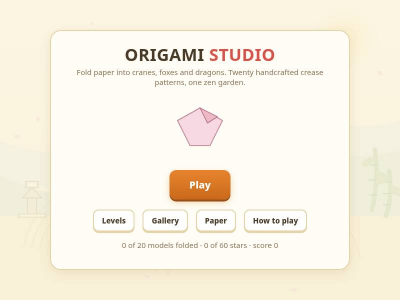
Origami Studio turns your screen into a zen garden folding table across 20 handcrafted levels. Every level is a real crease pattern: drag the glowing flap across valley and mountain lines, land each fold on its guide ring, and watch a flat square become a crane, a fox, a swan, or a dragon. Learn inside reverse folds, fold six units and assemble a kusudama ball, shape wet-folded curves for organic models, pleat full tessellations, and close with the Thousand Cranes finale against the clock. Wrong folds tear the paper, so study the crease pattern view like a planner. Finished models hang in your gallery with collector story cards, and new washi paper textures unlock as you progress. Gentle koto music, paper rustle sounds, and drifting cherry petals keep every session calm. No account required and no ads interrupt your game.
- Controls
- Drag the flap to the guide ring. C pattern view, H hint, P pause, M mute, R restart
- Supported devices
- Desktop, phone, tablet
- Developer
- Plyarc
- Genre
- Puzzle
- Latest update
- October 2026
- Rating
How to play
- 1
Press PLAY, then Fold on the level card. Levels 1 and 2 teach the drag gesture with a guided arrow.
- 2
Grab the glowing blue dot on the flap and drag it across the dashed crease line to the pulsing guide ring, then release.
- 3
Read the crease colors: blue dashed is a valley fold, red dotted is a mountain fold, purple is an inside reverse, teal is a wet fold curve.
- 4
Avoid the faint red false creases. Folding one tears the paper, and two tears end the attempt.
- 5
Finish all 20 patterns, assemble the kusudama balls, and beat the Thousand Cranes clock to become Origami Master.
Controls
Click and drag the paper flap with your mouse, release on the guide ring. C opens the crease pattern view, H shows a hint arrow, P or Esc pauses, M mutes, R restarts the level.
Drag the flap with your finger and release on the guide ring. Every button is sized for thumbs and the whole studio scales to fit your screen.
Tips & tricks
Drag all the way to the ring. A fold released just short springs back, so follow through past the crease line every time.
Study the crease pattern view (C) on tricky levels. Finished creases turn grey, the current one glows, and false creases show in red.
In the Thousand Cranes finale, fold fast but clean. Perfect releases score up to 250 points and the clock gives you 150 seconds for five cranes.
FAQ
How do you play Origami Studio?
Grab the glowing flap of paper, drag it across the dashed crease line to the pulsing guide ring, and release. Blue dashed creases are valley folds and red dotted creases are mountain folds. Fold 20 patterns from a paper crane to the Thousand Cranes finale.
Is Origami Studio free on Plyarc?
Yes, Origami Studio is completely free with no downloads, no account, and no ads during gameplay. Unlocked levels, stars, gallery models, washi paper, and achievements save privately in your browser.
What happens if you fold the wrong crease?
Some levels hide red false creases. Fold along one and the paper tears. Two tears ruin the sheet and you retry the level. Later levels add inside reverse folds, modular kusudama assembly, wet-folded curves, tessellations, and the timed finale.